Progress documentation
Before, during, and after photos with tags. The homeowner gets a story, not a random camera roll.
Capture photos, voice notes, and tags as you work. Export a zip with everything in it. It stays on your phone. No account.
For remodelers, plumbers, electricians, landscapers, painters, and small crews who need job-site proof without paperwork.
100% local. No sign-up. No cloud.
We cut the workflow down to what matters on a job site, then we stop. No onboarding wizard, no setup screens before your first photo, and no menus that exist to look impressive in a demo.
Three tabs: Jobs, Capture, and Settings. Everything rolls up under a job in a date-grouped timeline. Fast, glove-friendly, and built for how work moves on site.
index.html anyone can open and a structured job.json, then share through your phone's share sheet.
Independent contractors and small crews: remodel, plumbing, electrical, framing, landscaping, painting. If you need a clean record for the client, a change order, or Monday morning, this is for you.
Before, during, and after photos with tags. The homeowner gets a story, not a random camera roll.
Water damage, hidden conditions, failed inspections: time-stamped photos and voice notes in one job timeline.
Visual plus verbal proof when scope shifts. Less "he said / she said," more "here's what we found Tuesday."
A quick chronological trail of what happened on site: trades, weather notes, delays, completions.
Pick what matters, export a zip, then share by email, SMS, AirDrop, WhatsApp, or Drive. Your choice.
Built for outdoor use: quick capture loop, big tap targets, high contrast, no buried popups.
Every export is plain, portable, and client-readable on any device. Open it in a browser, drop the CSV in a spreadsheet, or pipe the JSON into your own tools. No special viewer app.
The archive opens anywhere. index.html is a static page with no JavaScript and no external assets.
index.csv is for spreadsheets.
job.json is the structured payload if you want to re-import or pipe it into another tool.
JobSiteRecords_<JobName>_2026-05-14.zip
 ├─ index.html      (opens in any browser)
 ├─ index.csv       (timestamps, captions, tags)
 ├─ job.json        (structured metadata)
 ├─ photos/
 │   └─ 2026-05-13_09-15_before_kitchen-demo.jpg
 ├─ voice_notes/
 │   └─ 2026-05-13_10-42_water-damage.m4a
 └─ notes/
     └─ 2026-05-13_10-42.txt
The mobile app stays free for jobs, capture, timeline, and zip export, and that promise is permanent. If your crew wants more, you can add a paid subscription as an option. It unlocks encrypted cloud sync, a web dashboard for the office (bigger screen, better for branded PDF reports), and team workspaces so multiple people share the same jobs, photos, voice notes, and tags under one bill. Solo contractors who never want the cloud never pay.
We keep the scope narrow on purpose: capture, organize per job, and handoff. Not a full PM suite or accounting stack.
Full capture workflow, local storage, and zip exports. Works offline. No subscription, no login for that mode, and that path stays free even after the paid tier ships.
Sync across devices, browser-based dashboard, shared access for the team, and Pro outputs like polished PDFs and voice-note transcription. You only pay if you turn this layer on for a workspace.
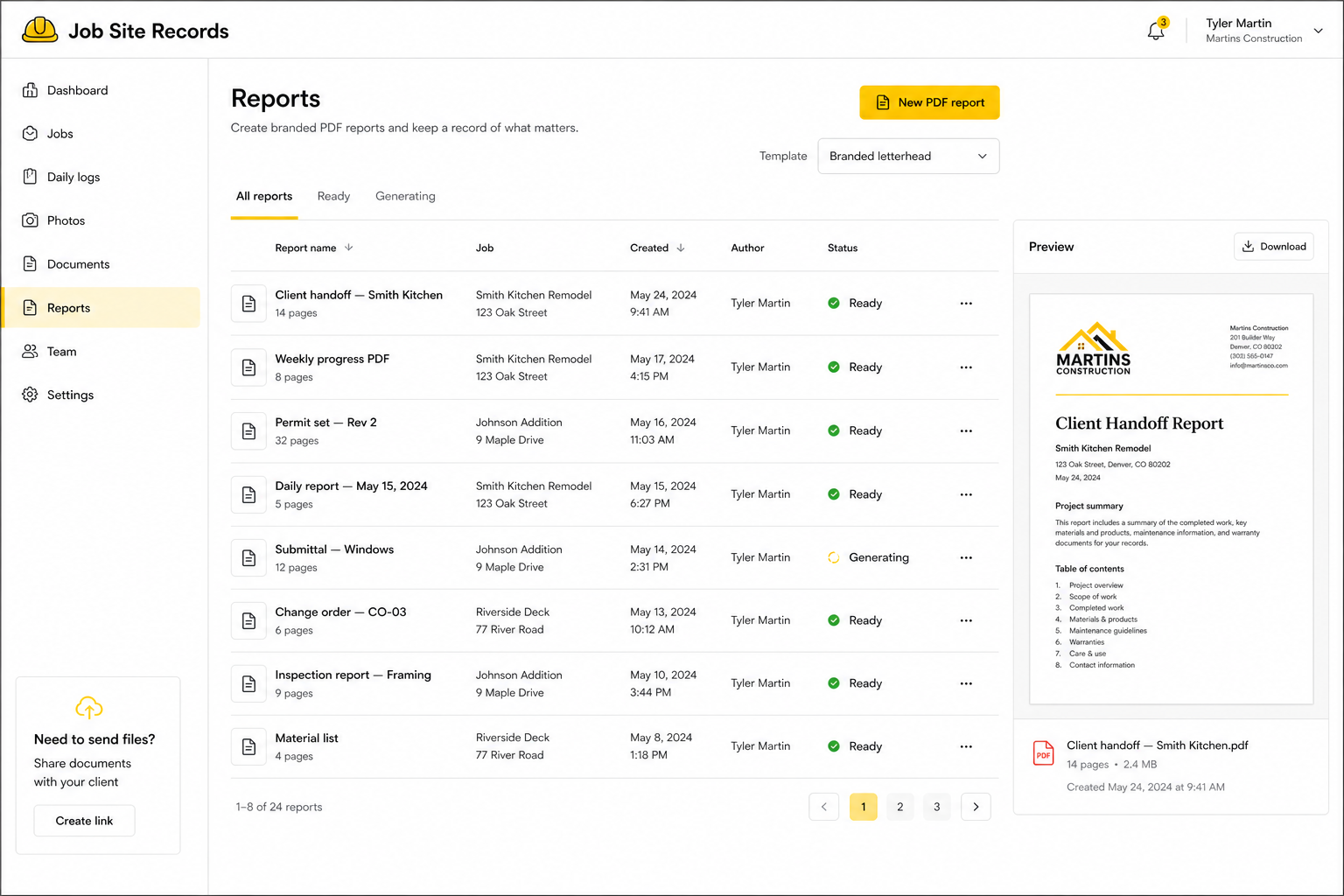
When your company turns on the paid workspace, the browser dashboard is where office staff work with the same projects the crew captures in the field. You get navigation for jobs, daily logs, photos, documents, reports, team settings, and a clear place to build client-ready PDFs without squinting at a phone screen.
The Reports area is built around branded PDFs: pick a template (for example letterhead), start a New PDF report, and track each file from Generating to Ready. The list ties every report back to a job and address, shows who created it, and when it was generated.
A live Preview pane lets you sanity-check layout before you download. That is the kind of work that belongs on a desktop monitor, while the free mobile app stays focused on fast capture on site.
The workflow is built on one rule: what you collect on the job stays on your phone until you choose to share it.
Yes. Jobs, capture, timeline, and zip export on your phone stay free. We only charge when a crew chooses the optional paid tier: encrypted cloud sync, the web dashboard, team workspaces under one subscription, and Pro features like branded PDFs and transcription. If you never turn that on, you never pay. We don't sell your data because we don't receive it while you stay local-only.
It is an add-on for teams that want the same data in the cloud and in a browser. You get sync across phones and tablets, a web dashboard for the office, shared access for staff on one workspace bill, and room for heavier outputs (for example branded PDF reports) that are awkward to build on a small phone screen. The field app itself stays free for local-only use. We keep the scope narrow on purpose: capture, organize per job, and handoff. Not a full PM suite or accounting stack.
Yes. Fully offline for capture, browse, and export. No login, no network dependency. The crew can work in a basement with no signal and pick right back up.
No. Everything stays on your device until you share an export through your phone's share sheet.
Each export is a zip with your photos, voice notes, an index.html that opens in any browser, an index.csv for spreadsheets, and a structured job.json. Anyone can open it. No special viewer app.
Request early access below. We're rolling out invitations in waves so onboarding stays smooth. You'll get an email when your spot is ready.
Yes. The workflow is the same no matter the trade. The default tags (Before, During, After, Issue, Completed) work across remodel, plumbing, electrical, framing, painting, landscaping and more. You can add your own.
Independent contractors and small crews who need dated, tagged evidence without paying for heavy enterprise tools.
We talk to contractors and office staff regularly. Tell us what you need on the job or in the office. That input feeds what we build next. If a feature would help your team on real work, we are willing to work with you on the details so it lands in a way you can use, not as a generic checkbox release.
Early access is rolling out in waves so onboarding stays smooth. Drop your details below and we'll send an invitation when your spot opens. The pain-point field helps us tailor onboarding to your trade.